
Black Ops 7 loadouts, camo tracker and footstep audio
PCO's Loadouts tab covers Black Ops 7: browse the weapons, open a weapon card for real builds and stats, build your own and share it with a code. Track your camos gun by gun, and tune your footstep audio with the Call of Duty preset. Results vary by headset.
Windows 10 or 11, 64-bit. Results vary by PC.
Black Ops 7 weapon cards with real builds
Every weapon card shows real builds with the actual attachment names, slots and unlock levels, plus pick rate, TTK, damage and handling bars.
- Black Ops 7 weapons list with playstyle and class filters and search
- Weapon cards: real builds, pick rate, TTK and stat bars
- Your old Black Ops 6 saves are kept as Legacy
Build, save and share your own
Pick each attachment (ammo included), perks and equipment, name the loadout and save it. Copy it as a code to share it, or paste a friend's code to import theirs.
- Five attachment slots, including ammo
- Perks and equipment
- Share codes for any loadout
Black Ops 7 camo tracker
See each camo's unlock challenge, tick off your progress per weapon and see what unlocks next. Progress stays on your PC.
- Multiplayer camos with progress per weapon
- Class filters
- Share your progress with a code
Footstep audio for Call of Duty
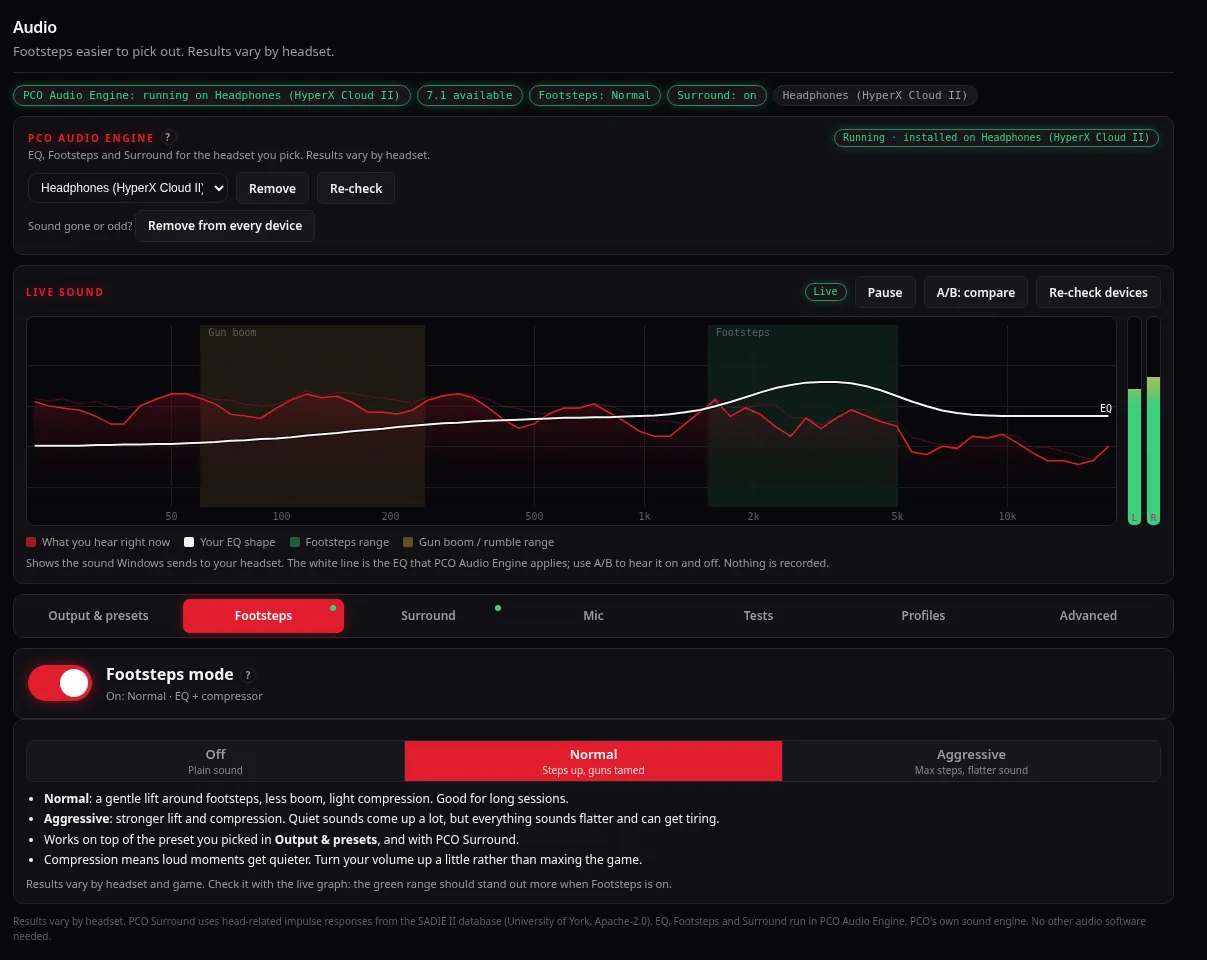
Pick Call of Duty in the Audio tab, choose a sound style and set Footsteps to Normal or Aggressive. Ready up in Loadouts applies the game's audio preset too.
- Call of Duty preset with Probe, Session, Night and Cast sound styles
- Footsteps mode: Off, Normal or Aggressive
- Live sound graph and A/B compare
Results vary by headset.
Straight answers.
What does PCO have for Black Ops 7?
What happened to my Black Ops 6 loadouts?
Does the footstep audio work with my headset?
Does PCO change game files?
Can I try it free?
Try it on your own setup.
Every key unlocks the full app. Try it free for 24 hours, or get a key from $3.
One free trial per person and PC. Requires a verified email.
No refunds once a key has been used.
Results vary by PC. Audio results also vary by headset.
Some icons and game data in PCO's Call of Duty tools come from MW4.GG, used with permission. Assets: MW4.GG(opens in a new tab)
PCO is not affiliated with Activision. Call of Duty and its game names belong to their owners.