Tune your PC for games.
Clean up without the risk.
PCOptimizer cleans out junk, repairs Windows system files, trims RAM and applies game-ready settings, all from one app. Cleaned files go to quarantine first so you can restore them, and Undo Last Tune rolls back the most recent tweak.
- Windows 10 & 11
- Cleanup with restore
- RAM trim & power plans
- SFC / DISM repair
- Game tuning
- No game injection
- Quarantine + one-click restore
- License key by email
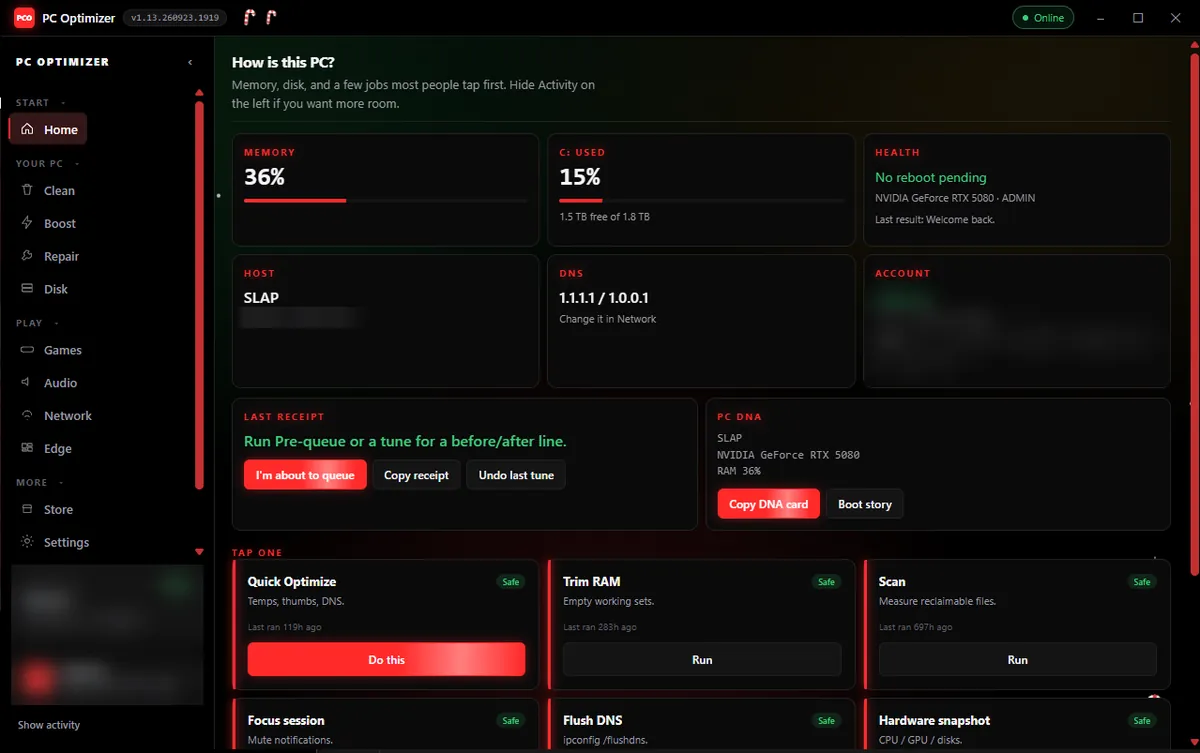
Home: “How is this PC?”
Memory, disk and the jobs most people tap first.
 PCO // PERFORMANCE SYSTEMS WINDOWS 10 / 11
Pick your license length
Every key unlocks the full app. Choose how long you want it for. Your license key is emailed to the address you used at checkout.
Lifetime Key⚡
Pay once, keep it. No subscription.
Your license key is emailed to the address you used at checkout.Paste it into PCOptimizer's login screen to unlock the full app. No email? Check spam, then write to [email protected].
Everything inside PCOptimizer
Cleanup, repair and game tuning in one app. Every action is labelled Safe, Ask first or Needs admin, and almost everything can be undone.
A. Pre-Queue & One-Tap Actions
Quick jobs to run right before you launch Valorant, CS2, Fortnite or Apex Legends.
One click to trim memory and quiet background notifications before a match, with a before/after receipt.
Copy a hardware card (CPU, GPU, RAM usage, host) to keep a baseline or share when asking for help.
Rolls back the most recent tweak if you don't like it.
B. Memory & Performance ("Boost")
Adjust how Windows hands out resources without touching game memory.
Asks Windows to release memory idle background apps (browsers, chat apps, overlays) are holding, without closing them.
Switch between High performance and Balanced plans, including core-parking settings.
Gives the game first claim on CPU cores through the Windows scheduler, without injecting anything.
C. Smart Disk Cleanup ("Clean")
Clears temp files and caches that pile up over months of normal Windows use.
Temp files, thumbnail cache and a DNS flush, without touching your Downloads or personal files.
Removed temp and browser files go to quarantine first, so you can bring them back.
Measures browser caches (Chrome, Edge, Firefox, Brave, Opera GX), crash dumps and Windows temp folders before anything is removed.
D. System Repair ("Repair")
Runs Windows' own recovery tools for you, without a command prompt.
Runs and monitors sfc /scannow in the background.
One-click DISM /RestoreHealth when SFC alone can't finish the job.
Prompts for a System Restore checkpoint before deeper changes.
- Auto-tune when you game
Game detection applies Game Mode, Hardware-Accelerated GPU Scheduling and fullscreen optimization settings automatically.
- DNS presets & flush
Switch between DNS presets and flush the DNS cache without digging through adapter settings.
- Audio mixer & presets
Per-app volume and mute in one panel, plus presets for games, music or calls.
- Tray app & scheduler
Lives in the system tray and runs maintenance on a schedule you set.
- Verified self-updates
Updates install themselves, and each download is checked against its SHA-256 hash before it runs.
- Focus session
Mute notifications while you play, straight from the Home screen.
Exactly what each tool does
No vague “speeds up your PC” claims. Pick a module to see the real mechanism behind every action, what it touches, what it refuses to touch, and how to undo it.
Clean
Reclaim disk space from caches Windows forgets to empty
Clean scans the folders that accumulate junk over months of normal use: Windows temp directories, thumbnail databases, crash dumps, delivery-optimization leftovers and per-browser caches. It measures first and removes second, so you see the real number before anything is touched, and removed temp and browser files go to quarantine so you can bring them back.
Measures reclaimable bytes per target without deleting anything.
Clears temp files, thumbnail cache and flushes the DNS resolver cache.
Deletes only the targets you leave checked after a scan.
Reaches component-store and system-level caches a normal pass skips.
- %TEMP% and C:\Windows\Temp
- Explorer thumbnail + icon cache databases
- Windows crash dumps and minidumps
- Delivery Optimization / Windows Update download leftovers
- Browser HTTP + shader caches (Chrome, Edge, Brave, Firefox, Opera GX)
- Recycle Bin (only when explicitly confirmed)
- Saved passwords, cookies or login sessions
- Browser bookmarks, history or profiles
- Documents, Downloads or any personal files
- Installed programs or game files
How much it finds depends entirely on the machine. A PC that has never been cleaned usually has more to reclaim; on an already-tidy system it may find very little, which is normal and not a fault.
See the actual app
Real screens from the current PCOptimizer build, shown with the Christmas theme. Personal details are blurred.
How is this PC?
Memory, C: usage and health at a glance, a before/after receipt for your last tune, a copyable PC DNA card, and one-tap jobs like Quick Optimize, Trim RAM and Scan.
No injection. No hooks. No game file changes.
PCOptimizer works through Windows APIs, power plans and memory working sets, outside any game's memory. It doesn't hook into games or modify their files. No tool can promise it fits every anti-cheat policy, so if your game's rules forbid optimization utilities, follow the game's rules.
The details most sites bury
Requirements, privacy boundaries, anti-cheat posture and exactly how licensing behaves — before you buy.
System requirements
- Operating system
- Windows 10 (21H2+) or Windows 11, 64-bit
- Processor
- Any x64 CPU — Intel or AMD
- Memory
- 2 GB RAM minimum (4 GB+ recommended)
- Disk space
- ~60 MB installed
- Privileges
- Standard user for most tools; admin for SFC, DISM and Deep Clean
- Background usage
- Runs from the system tray; scheduled maintenance only when you set it
- Connectivity
- Online for license activation and updates (SHA-256 checked)
- Not supported
- macOS, Linux, ARM Windows, Windows 7/8
Anti-cheat & system safety
PCOptimizer never injects DLLs, hooks game processes or modifies game files. Priority and affinity are set from outside through the OS scheduler, the same surface Task Manager uses.
Nothing in PCOptimizer changes GPU or CPU voltage, clock speeds or power limits. Performance work is limited to Windows power plans and scheduling.
PCOptimizer deliberately avoids 'registry cleaner' behaviour. Only specific, documented networking values are written, and they can be reverted.
Undo Last Tune reverses the most recent change, and System Restore checkpoints are offered before elevated repairs.
Worth saying plainly: no third-party tool can be guaranteed against every anti-cheat policy. PCOptimizer avoids the techniques that cause problems — injection, hooking and file modification — but if your game's rules forbid optimisation utilities outright, follow your game's rules.
Privacy boundaries
Hardware readings, directory sizes and process lists are read on your machine and rendered in the app. They are not uploaded as part of normal operation.
Cleanup works on file paths and sizes. PCOptimizer does not open, parse or transmit the contents of your documents.
Browser cleanup is limited to HTTP and shader caches. Password stores, cookies, bookmarks and profile data are excluded by design.
Anything irreversible — Recycle Bin, crash dumps, Deep Clean — requires explicit confirmation, and deeper repairs prompt for a restore point first.
How licensing works
- Delivery
- Your license key is emailed to the address you used at checkout
- Activation
- Paste the key into PCOptimizer's login screen; it's tied to that PC
- Free mode
- The app runs in free mode until you add a key
- 1 Day / 1 Week / 1 Month
- Key stops working when the period ends. No auto-renewal
- Lifetime
- One payment, no recurring charge
- Billing model
- One-time Stripe payment per key. No subscription is created for any tier